
So you’ve got NetSuite, but you also have another business tool that you need data from. The usual answer is a custom integration project. That means weeks of scoping, maybe a middleware tool, ongoing maintenance, and — above all — cost. For one of our clients, that wasn’t a feasible approach, so we tried something different: taking five minutes a day to ask Claude to translate data from one system to another while still keeping the human verification step in place to ensure accuracy. It’s not an “integration.” It’s a repeatable manual process that happens to be fast enough to feel like one.
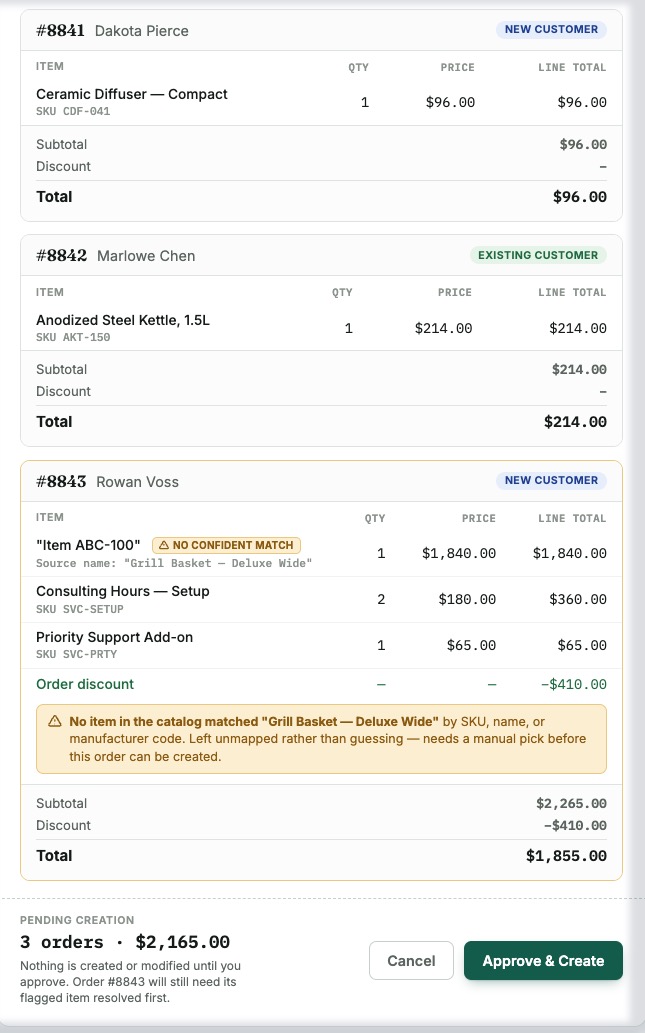
We tested this end to end: pull an order export from Shopify, then use the MCP Connector in NetSuite to review our sales order structure and import the orders to NetSuite, but only after getting manual approval from the user. Three orders in total with 5 line items spread across those orders, and the results were surprising.
Where Claude Held the Line
The first thing we ran into that was really encouraging: Claude wouldn’t guess its way past a business rule. When creating the new customers for the order, we hit a workflow gate blocking record creation with a message to loop in a specific person first. This wasn’t a missing-field error but an actual approval control. Claude tried one reasonable variation, confirmed the block wasn’t conditional, and stopped. From this point it laid out the real options for the user — get sign-off, tell it the bypass mechanism if one existed, or don’t proceed. What it didn’t do is a bunch of trial-and-erroring its way around a gate someone put there on purpose.
Where the Fix Got Messy
The next positive thing we saw was that Claude caught its own mistakes and told us when it couldn’t fully fix them. On the second order, it mapped a line item to the wrong catalog entry — two items with near-identical SKUs. As part of the process, Claude ran a verification step and noticed the error before it became an issue. The fix attempt is where things got a little messy.
As we’ve talked about before in our blog posts for this series, we are very careful about the permissions we give to our roles with MCP permissions. The underlying fix — deleting and recreating the transaction — needed broader delete permissions than we wanted to grant for a test. So the total got zeroed out correctly on the bad lines, but two $0 “ghost lines” stayed on the order as a cosmetic loose end, which ended up requiring a manual cleanup, not an automated one. The encouraging part of this issue is that again Claude realized its mistake and suggested ways for the user to correct the issue.
What We Wouldn’t Trust It to Map on Its Own
We also asked Claude to supply a list of fields from the export it wouldn’t confidently map. It ended up being mostly marketing and storefront metadata that had no business in a financial system anyway. If this were a real scenario, we likely would not have included those fields in the order export in the first place, but we always recommend generating a list like this to make sure hallucination didn’t affect the real business data.
What We’re Changing for the Real Version
There are a lot of things we will set up differently for the production run of this test. We will probably have instructions built into a Claude project that can be used for this repeatable process every day. We will probably include some schema mapping as an artifact in the project so there is less guesswork by the AI. But what we did in this test validated that it can be a real process that replaces costly integrations.
Weighing whether this fits your NetSuite setup? If you’re staring down a costly integration project, we’re happy to talk through whether an AI-assisted approach could work instead. Book a free consultation or reach out and we’ll take a look at what’s possible in your NetSuite environment.
This post is part of our AI + NetSuite series — a hands-on look at what AI can actually do inside a live NetSuite account.