
Every sales team I have ever worked with has the same problem. The meeting ends, everyone knows what the next steps are – but there are a few different calls scheduled back to back. By the time someone logs into NetSuite to update the opportunity, add contacts, and document next actions, it’s been 24 hours and half the detail is gone. Even when using AI notetakers in meetings to keep track of details, after some time has passed, logging all that information feels more like busywork than real useful sales activity.
We decided to test whether Claude and the NetSuite MCP connector could reduce that pain point for us. Here’s what we actually did; where it worked, where it didn’t, and what we’re thinking about trying next.
What We Were Trying to Do
We run sales calls with multiple contacts on the prospect side. After each call we need to:
- Add any new contacts to the customer record in NetSuite that may have been introduced in that call
- Update the opportunity details with our most up to date understanding of the scope of the opportunity
- Log next actions, including questions raised by specific contacts that we need to come back to. All of these help make sure nothing from the conversation falls through the cracks.
The manual version of this can easily take 10-15 minutes if you do it right. More often we can only find 5 minutes and something gets missed.
In our situation, we load our meeting transcripts into a Claude project as we go — so by the third or fourth call, Claude has the full history of the engagement. It helps us keep track of what was covered, what was promised, what questions came up and never got answered. That cumulative context is what makes the post-meeting workflow actually useful for us. The AI isn’t working from a single transcript in isolation — it’s working from all the details we have about this prospect and opportunity.
How We Worked Through It
We ran this in steps, not as a single prompt. Whenever you are giving an AI permission to write data directly into NetSuite, reviewing one thing at a time is how you catch small mistakes before they become big problems.
Step 1: Contact Identification
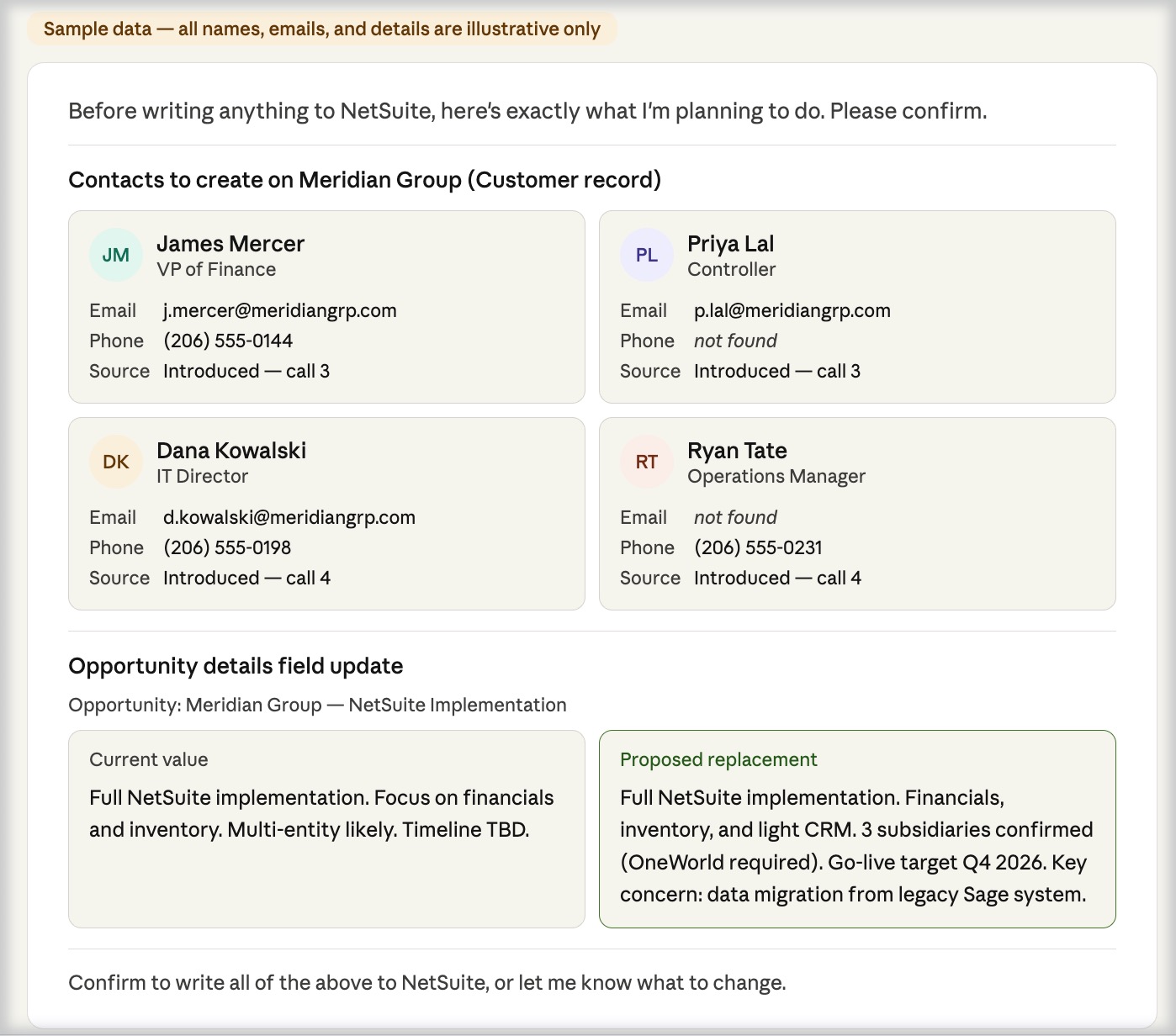
We asked Claude to identify any new contacts introduced during the call — names, titles, anything mentioned about their role — and cross-reference that against public information from LinkedIn profiles. It surfaced four contacts to add to our existing prospect record, with relevant information called out: name, title, email, and phone where available.
Before writing anything, Claude presented the full list with a field-by-field breakdown and asked for confirmation before writing anything to NetSuite. We reviewed each one for any errors or issues, and approved.
Step 2: Opportunity Details Update
We also asked Claude to update the opportunity details field — what we use internally to capture current scope understanding — based on everything discussed across all calls to date.
This is where the confirmation step matters most. Claude showed us exactly what was currently in the field and exactly what it intended to replace it with. This is not an optional step when you are talking about allowing AI agents to update your data directly. If you skip that review and the AI writes something that doesn’t match where the deal actually is, you’ve now got inaccurate data sitting in your CRM and potentially informing your next conversation with the client.
We reviewed the proposed update, adjusted the language in a couple of places, and approved.
Step 3: Next Actions
This is where it gets more interesting. We didn’t just log generic next steps — we logged next actions informed by what each contact raised during the call.
Different contacts ask different questions. Some want technical depth. Some want to understand process impact. Some are focused on timeline and cost. When you’re tracking those questions by person, you can frame your follow-up in a way that actually lands for each stakeholder rather than sending one generic response.
Claude pulled the contact-level questions from the transcript, flagged the items we hadn’t answered yet, and drafted next actions that addressed each one. Again, we reviewed and approved before anything was written to NetSuite.
Where It Didn’t Work
One thing Claude couldn’t figure out on its own: after creating the contacts on the customer record, it wasn’t able to attach them to the opportunity record as well. In NetSuite those are two separate relationships — a contact linked to a customer and a contact linked to a specific opportunity — and the MCP connector didn’t navigate that cleanly.
We added them to the opportunity manually. Not a dealbreaker, but worth knowing going in. It’s the kind of thing that’s easy to miss if you’re not already familiar with how NetSuite structures contact relationships.
The Guardrails Matter More Here Than Anywhere Else
The AR aging and data quality posts in this series were read-only operations. This one isn’t.
Any time AI has write access to your NetSuite records, you need a confirmation step before anything gets committed. We prompt Claude explicitly: tell me exactly what you’re going to write, what field it’s going into, and what’s currently there. Then we approve.
This isn’t just good practice — it’s how you avoid torpedoing a deal. If Claude misreads the transcript and writes the wrong scope into your opportunity details, and you don’t catch it, you might walk into your next call with the wrong framing. The AI can move fast, which is incredibly useful — but fast and wrong is worse than slow and right.
Build the review into your prompt. Don’t rely on yourself to remember to ask.
What We Want to Try Next
We ran this test without a couple of layers we think could add real value:
Pre-meeting prep notes. After updating NetSuite post-call, you could have Claude post a brief to the next scheduled call record — open questions, contact context, where the deal stands. That way your prep is already in NetSuite when you pull up the record before the next meeting. Two minutes of review instead of hunting through notes.
Scheduled follow-up tasks. We didn’t create tasks in this test, but the transcript had clear commitments on both sides. Those could be written directly to NetSuite as tasks on the opportunity — assigned, due-dated, ready to go.
Both are logical next steps. We’ll test them and report back.
The Takeaway
The post-meeting update workflow is one of the most consistently skipped parts of any sales process. Not because people don’t know it matters — because it’s tedious and it happens right when everyone wants to move on to the next thing.
What we found: AI can do most of the work, but it needs structure, it needs your review, and it’s not going to get every NetSuite relationship right without some manual cleanup. That’s fine. It’s still dramatically faster than doing it from scratch, and the output is more complete because it’s working from the full transcript rather than whatever you remembered to type.
Part of our AI + NetSuite series. Start with the pillar post: What Can AI Actually Do Inside Your NetSuite Account?
Want to see how this could work in your sales process? We’re happy to walk through how the NetSuite MCP connector fits your setup. Book a free consultation to talk through what makes sense for your team.