
You’re jumping on a call in ten minutes and your manager wants to know where a client stands on their NetSuite open invoices. You know the answer is in NetSuite. You also know that pulling it up means logging in, navigating to a saved search, hoping someone built the right one, and waiting for a report to load.
There’s a faster path — and we tested it.
Why We Ran This Test
We didn’t just want to know who owed money and how much. We wanted to know whether those invoices had actually been communicated to the client — that the emails had gone out, that this wasn’t a billing system hiccup, and that any overdue balances were genuinely overdue rather than invoices the client had never received.
This is a question that comes up more than you’d think in managed services. A client flags a past-due balance. Before anyone picks up the phone, someone needs to confirm: did we actually send the invoice? Was it a workflow failure? Did it go to the right contact? In most NetSuite environments, answering that question means navigating to the invoice, opening the Communication tab, and checking manually — one invoice at a time. For a client with 30+ open invoices across multiple aging buckets, that’s not a quick task.
That’s the full scenario we were testing: not just AR aging, but AR aging plus confirmation that communication had been sent — all in a single session, without logging into the UI.
What We Were Trying to Do
We connected Claude to our NetSuite account using the NetSuite MCP connector and asked it to do two things in a single session: pull NetSuite open invoices for a specific client bucketed by aging, and then verify that those invoices had actually been sent to the client.
That second part was the critical piece. The goal wasn’t just to surface overdue balances — it was to confirm whether the invoices had ever reached the client in the first place. Before anyone follows up on a past-due balance, you need to rule out the obvious: did the invoice actually go out, or was there a system error? Did it go to the right contact? Is the client sitting on a legitimate invoice they received, or one they never saw?
No saved search. No SuiteScript. Just a plain-language request:
“Look up all open invoices for [client name]. Break them down by aging bucket — current, 1–30, 31–60, 61–90, and 90+ days past due. Then check whether any communications have been sent against those invoices.”
The whole thing took about 30 seconds, and surfaced something we didn’t expect.
What Came Back: NetSuite Open Invoices by Aging Bucket
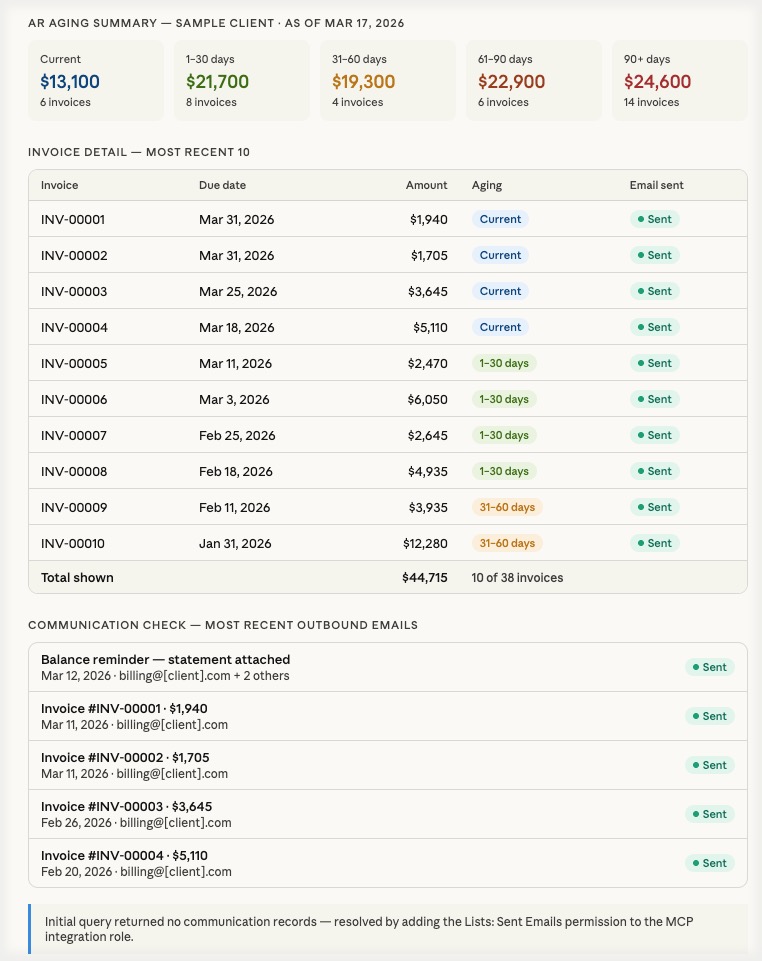
The query returned a complete list of NetSuite open invoices across various aging buckets. This included everything from current invoices not yet due through a string of older invoices stretching back several months past due — all organized into perfect little buckets. Total outstanding amounts across all buckets were clearly visible without any manual math.
For a finance ops person who checks AR aging constantly, this is genuinely useful. You get a count and total by aging bucket, specific invoice numbers and due dates, and enough context to prep for a collections call or answer a leadership question on the spot.
What you don’t get from this query alone is partial payment status or unapplied credits — those require a more specific query. But for a quick directional snapshot, it’s exactly what you need.
Where It Got Interesting — and Honest
The communication check is where things got more nuanced, and worth being direct about.
When asked to pull communication history on the invoices, the AI queried what it determined to be the most logical table — the standard message table that NetSuite uses for email and communication records. That’s a reasonable assumption. It’s the table documented for this purpose, and it returned results for some records without any errors or warnings.
The problem was invisible from the AI’s side: it simply didn’t see the automated invoice emails. No error. No flag. No indication anything was missing. Just results that looked plausible — some communication history present, some invoices with nothing attached — and no way to distinguish between “nothing was sent” and “you don’t have permission to see what was sent.”
It took a human in the loop to catch it. The results didn’t match what we knew to be true about how invoices go out in our environment. That prompted the troubleshooting that eventually surfaced the real issue: the MCP connector’s role was missing the Lists – Sent Emails permission, which controls access to a separate table — sentemail — where NetSuite stores automated transaction emails. Without it, that entire communication history is simply invisible to SuiteQL, and the AI has no way to know it’s missing.
Once the permission was added, the full picture appeared: every invoice sent, the recipient, the date, and the delivery status. The communication gap we thought we’d found didn’t exist. The emails had gone out. This was a permission configuration issue, not a billing system failure — exactly the kind of thing you’d want to confirm before calling a client about an overdue balance.
The Setup Detail That Makes or Breaks This
The MCP connector connects to NetSuite under a specific role. That role’s permissions determine exactly what the AI can and can’t see. This isn’t a limitation of the AI — it’s standard NetSuite role-based access control working exactly as designed.
But it creates a real risk: a query that returns no data looks identical to a query that returns correct data showing nothing is there. SuiteQL doesn’t tell you “you don’t have permission to see this.” It just returns zero rows.
For AR communication auditing specifically, make sure your integration role has:
- Lists – Track Messages — for manually composed and inbound email
- Lists – Sent Emails — for automated transaction emails sent via workflow or billing processes
Without both, your communication audit is incomplete and you won’t know it.
What This Is Good For (and What It Isn’t)
Good for:
- Quick AR snapshot before a call or meeting
- Collections prep — who’s past due and by how much
- Confirming invoices were actually sent before following up on a past-due balance
- Answering a leadership question without opening NetSuite
Not a replacement for:
- Your formal AR Aging report — that accounts for partial payments, credit memos, and multi-currency in ways a quick query doesn’t
- A saved search you’ve built and validated over time — this is a spot check, not a system of record
- Judgment — the AI returns what the data says, not what the data means
That last point matters more than it sounds. The most valuable thing we did in this test wasn’t the query — it was checking the results against what we already knew to be true. The AI doesn’t know your data is incomplete or that a permission is misconfigured. You do. Treat AI output as a strong first pass that still requires a human gut-check, not a final answer.
Want to run this kind of query against your own NetSuite environment? We can walk you through the setup or do it with you. Book a free consultation and we’ll take a look together.
Takeaway
The ability to query NetSuite open invoices without logging in, building a saved search, or spinning up a developer is genuinely useful — especially for finance ops teams and managed services clients who need quick answers on demand.
But the two things we learned in testing matter just as much as the capability itself: get your integration role permissions right before you trust the results, and always verify AI output against something you can independently confirm. The tool is only as reliable as the access you’ve given it — and it won’t tell you when that access falls short.
This is part of our ongoing AI + NetSuite series. The pillar post — What Can AI Actually Do Inside Your NetSuite Account? A Hands-On Look — covers the full picture of what’s possible, what’s not, and where to be careful.
Want to talk through how this could work in your NetSuite environment? We’re happy to walk through it. Book a free consultation or drop us a line.